
 Mexico - Español
  China - 中文
  Australia - English
  Canada - English
  India - English
  United Kingdom - English
  United States - English
  France - Français
  Italy - Italian
  Brazil - Português
  Argentina - Español
  Chile - Español
  Colombia - Español
  Guatemala - Español
  Puerto Rico - Español
  Spain - Español
 Declare your products in international shipments without entering the same information twice
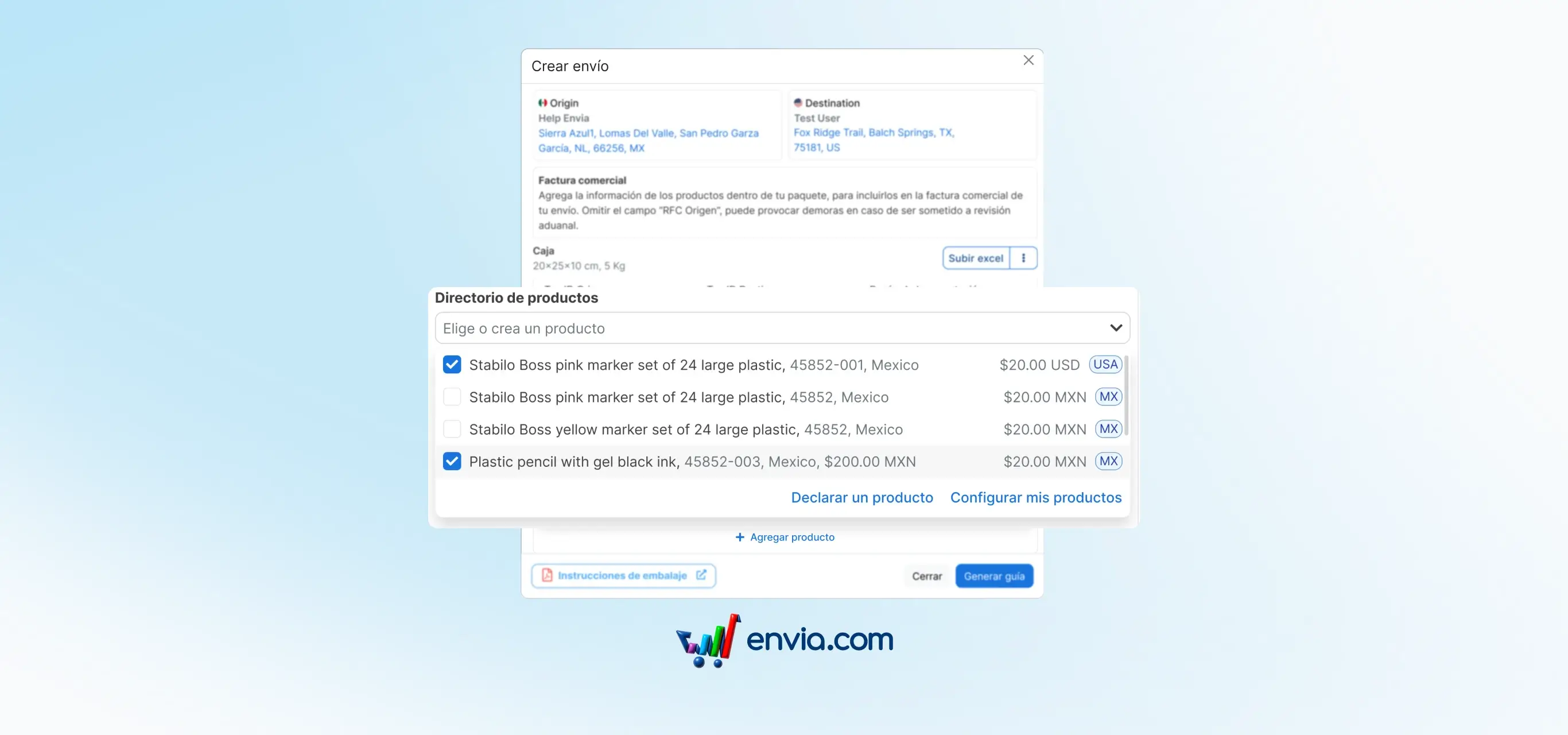
When you create an international shipment, the destination country's customs requires you to declare the products inside the package. Now, when generating an international label, a product search box appears where you can select any item from your Envia catalogue. Once selected, the information fills in automatically. If the product doesn't exist yet, you can create it right there without leaving the flow.
Benefits
- Select the product from your catalogue and customs data fills in automatically, without entering the same information every time you make an international shipment.
- Lower risk of errors in the customs declaration: data comes from your catalogue, not from a manual entry that may have typos or incomplete information.
- If the product doesn't exist in your catalogue, you can declare it from the same form without switching screens or interrupting the shipment generation.
Note
The selector shows products from your offline Envia catalogue and products synchronised from your e-commerce stores. The information filled in automatically matches what you have registered for each product. If you need to edit it before generating the shipment, you can do so directly from the form.