
 Mexico - Español
  China - 中文
  Australia - English
  Canada - English
  India - English
  United Kingdom - English
  United States - English
  France - Français
  Italy - Italian
  Brazil - Português
  Argentina - Español
  Chile - Español
  Colombia - Español
  Guatemala - Español
  Puerto Rico - Español
  Spain - Español
 Everything you need to run your operation is on your home screen
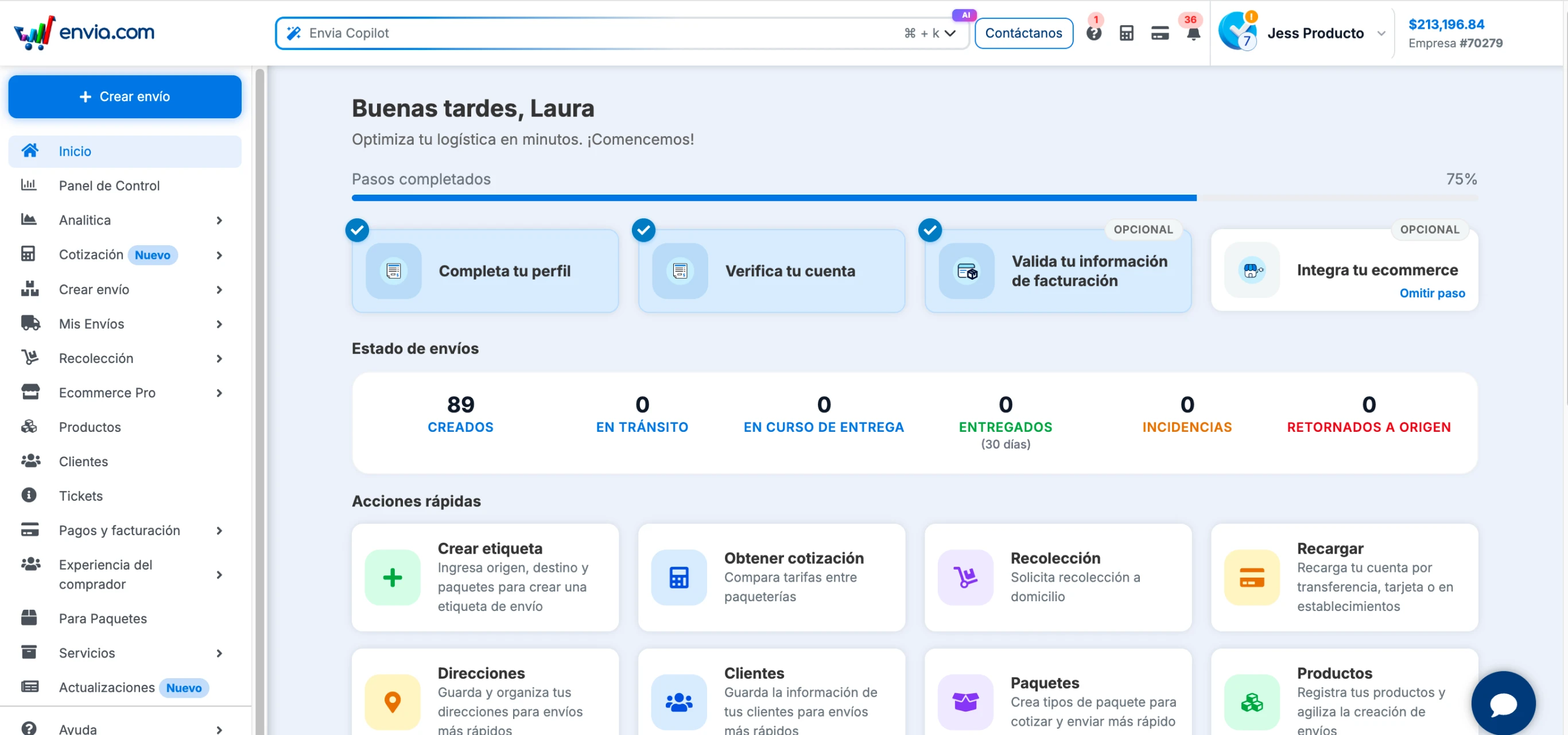
Your home page is the first screen you see when you log into Envia and it's now designed so that within seconds you know exactly how your operation is going and can take action without navigating the menu. From there you have the real-time status of your shipments over the last 30 days: how many you created, how many are in transit, how many have issues and how many were returned. You also find your 8 most frequent actions in one click, from creating a label to reloading your balance, and direct access to the 12 platform configuration areas. And if you work with other Envia services, they're there too: Cargo, Fulfillment, WMS, Para Paquetes and Ecart Pay, with direct access from the same screen.
Benefits
- Know how many shipments you created, how many are in transit and how many have issues — in the first seconds of the day, without opening a single extra screen.
- Create a label, quote a shipment, configure your carriers or check your account balance: everything starts from the same screen, with one click.
- A clearer, more organised and faster experience from the very first click
Note
Addresses, Packages, Customers and Products are still there, now inside Quick Actions. Your shipments, integrations and settings work exactly the same as before.