
 Mexico - Español
  China - 中文
  Australia - English
  Canada - English
  India - English
  United Kingdom - English
  United States - English
  France - Français
  Italy - Italian
  Brazil - Português
  Argentina - Español
  Chile - Español
  Colombia - Español
  Guatemala - Español
  Puerto Rico - Español
  Spain - Español
 The full detail of each shipment now opens in a side panel with everything organised in three tabs
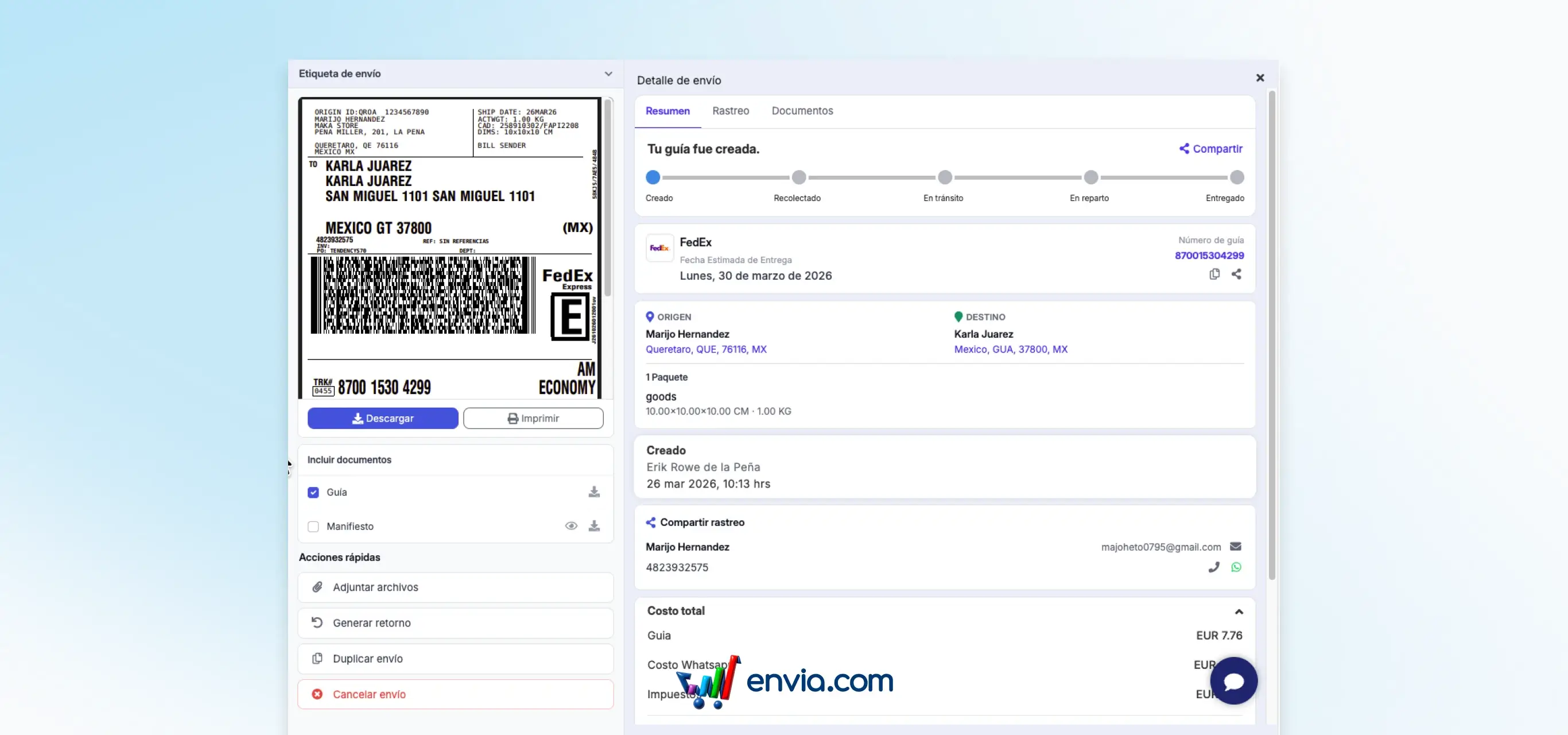
When you click on any shipment in your list, a side panel opens on the right with all the information organized in three tabs: Summary with the general data of the shipment, Tracking with the status and movements of the package, and Documents where you can see the PDF guide, the manifest and the packing list (available only for Ecommerce Pro shipments), in addition to uploading additional documents for international shipments or evidence in case of incidents. From the same panel you can also generate a return, duplicate the shipment or cancel it, without having to open a separate screen. The PDF guide can be viewed directly from the dashboard without needing to download it first.
Benefits
- Access summary, tracking and documents for each shipment from a single side panel, without opening additional screens
- Review the PDF guide directly in the panel before downloading it, to confirm that it is correct without extra steps
- Generate returns, duplicate or cancel shipments from the same panel, without changing screens or repeating searches in the list
Note
The packing list is only available for shipments generated from Ecommerce Pro. The Documents tab also allows you to upload additional evidence in case of incidents or documentation required for international shipments.